Where do I preserve my writing?
Every writer eventually asks the same question, “Where do I keep all of this?” The scattered journal pages, the notes across apps on your phone, the stickies found hidden inside the edges of your junk drawer. Those who write daily accumulate years' worth of words, often without knowing how to preserve them as the intellectual property they deserve to become. I’ve spent years searching for an answer, trying nearly every journaling app I could get my hands on.
Writing became part of my daily life long before I called it journaling in my mind. It became a way for me to process the world around me, study in school or college, and cope with emotions bigger than my current understanding. Writing became an anchor in my life that kept me grounded through even the worst of life’s transitions. Part of the practice of writing has been discovering the mediums in which it was easiest to allow the words to flow from my mind to the page or screen.
Some days I find myself writing by hand in a simple composition notebook with a trusty Pilot Precise V5 RT pen, and other days I am found typing away at my Macbook Pro collecting thoughts in apps like Obsidian or Notion. As my mood changes, I adapt with the medium that works best in the moment. That also means that, up until now, my musings have been scattered in various places with little to no structure for recall.
Recently, I began transcribing my journals into a digital medium to preserve the integrity behind them. I hunted for the best app to make it easy and functional to transcribe my handwritten notes into digital files. I tried the Notes app provided by Apple but struggled to name and categorize the data well, so I’m left with a few hundred files and no system in place for organization. I tried the Journal app for a week or two as well but found it less than desirable because I knew I didn’t own the data I placed there, and there would be no easy way to import or export it.
I have used a plethora of different digital note taking apps from ones where you use an apple pencil on an iPad like GoodNotes and Notability to those that are more type-note-centric using a computer or your phone, like word processors. The app I have a tendency to gravitate toward the most is Obsidian.

Obsidian App Logo
Obsidian is free and available on both Mac and PC. It does not require a login and can be saved directly to your device, a USB hard drive, or your choice of cloud storage. Meaning, it is protected by never having to be uploaded to a cloud for other people to own or obtain your information. If necessary, you can use this Markdown editor to keep your notes relatively secure and safe.
I like Obsidian for those very reasons. It can be uploaded to the cloud for use across devices, or you can have a secret vault hidden inside a .folder on your terminal. The choice is yours. Obsidian has a few interesting features that I find rather useful.
First, it has community plugins available for download so you can customize the vault in a way that is functional for your own use. There are calendar add-ons that I find very helpful, and workspace options that let you make your workspace a template for future use. (Imagine having a computer inside of your computer.) That's what Obsidian really feels like.
Second are the customizations that you can do, like adding your own fonts to the vault or uploading CSS color schemes. It's perfect for those with a natural development background because it works as a true Markdown editor. If you don't know what that is, Markdown is a lightweight formatting language that can be converted into HTML for your browser to display, using headings from H1 through H6. There are a few features that make it very easy to use, and I'll cover how I have my personal vault set up in another post or video.
I like Obsidian the best, but Notion is my second favorite app for journaling and beyond. Notion is a database app that has the abilities of Word and Excel combined, to an extent. However, it is open-sourced and sandboxed with a very steep learning curve. I spent two to three years learning how to build functional databases and workstations in Notion that might discourage others from ever trying the app. That's one of the main reasons why I suggest Obsidian as the best app for journalers and writers. Don't get me wrong—some templates on Notion are useful, and there are many creators, like Thomas Frank on YouTube, who teach how to use the program in a very understandable way. However, many of the better templates, like the Second Brain system, cost upwards of $100 to purchase.
Dare I say I like to make things more difficult on myself by trying to figure them out on my own—the curse of DIY—but I couldn't see paying for someone else's version of a perfect database when I knew I wanted something different with varying aesthetics. Notion can be good for journaling once you have a workstation created with a functional database, but I don't expect the average individual to desire to do that like I did. Some people would rather have things made for them than learn an entirely new program.
Ultimately, I feel that Obsidian has the most benefits and security measures to keep your writing safe, secure, and easy to read and edit.
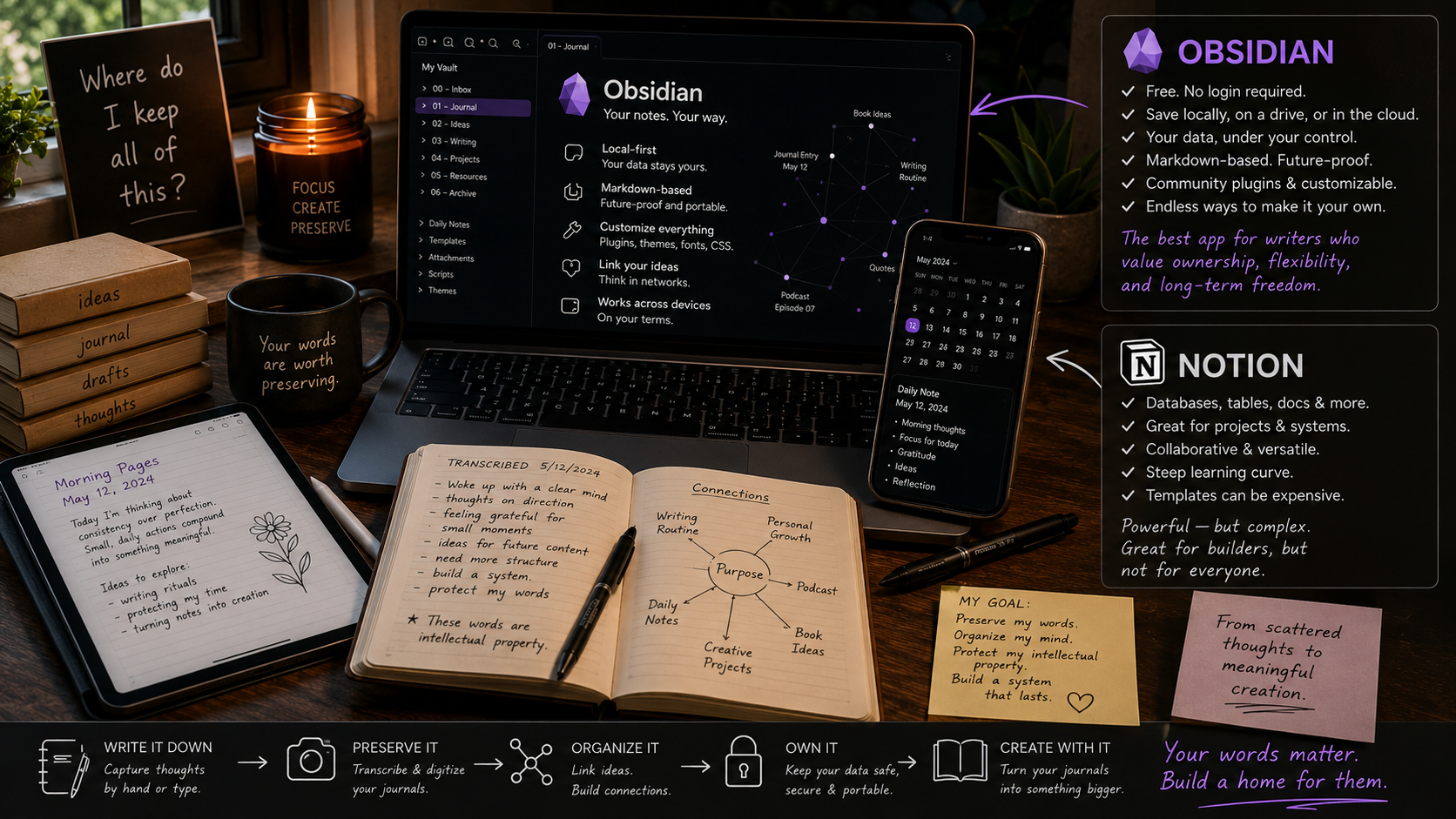
Obsidian gives you freedom of expression while allowing you to own your data.
Thank you for stopping by to read from the She Writes blog. Each piece is written from the heart with intention of finding those who need it most. If this resonated, feel free to let me know.
Not sure what to do next?
Grab your writing companion —> Trustfall Daily